One assistant, multiple trust boundaries
The authorization boundary is not at answer generation. It is before knowledge reaches the agent.
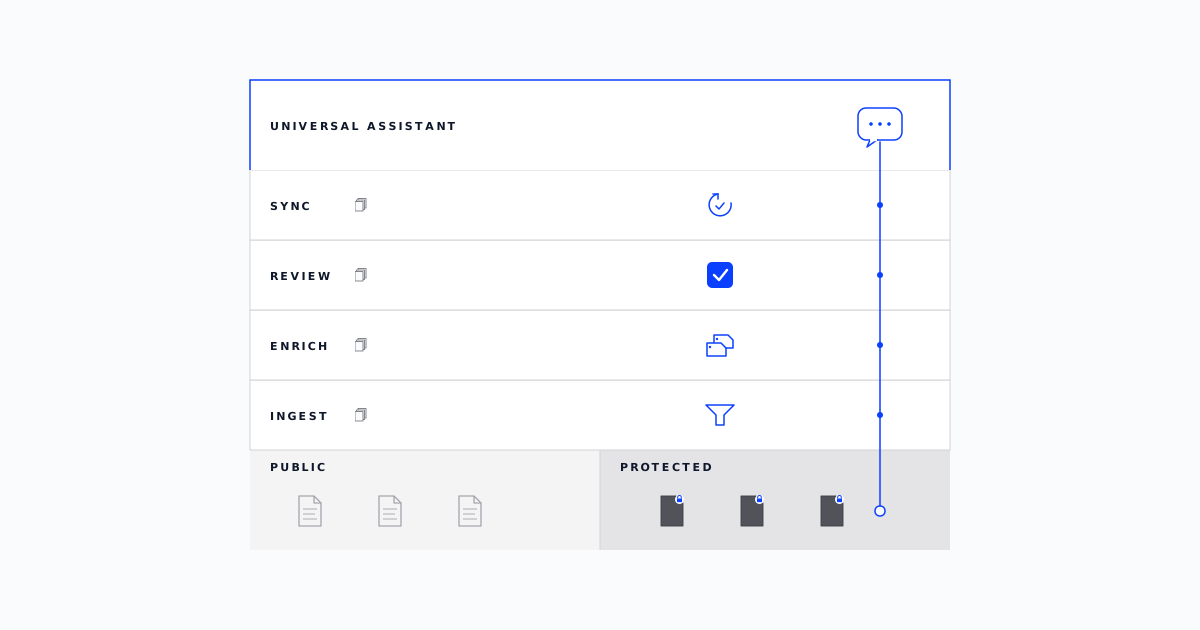
Universal Assistant is Infinize's conversational AI for higher education, one place for prospects, students, faculty, and advisors to ask questions and navigate any campus workflow. To the user, it's one experience. To the platform, those are four different trust boundaries, and some of that content should never reach the wrong person. So we built a control plane that governs the whole knowledge lifecycle, drawing the authorization line before context reaches the agent.
So we divided knowledge into two types: Public and Protected. Public content contains information such as admissions pages, catalogs, and department sites from the website that is incrementally crawled, tagged, cleaned, grouped, and indexed for retrieval in the assistant. Protected content, such as internal handbooks, advisor procedures, and faculty-only guidance, is uploaded through the same portal and is tagged, grouped, and gated by least-privilege policies.
Universal Assistant also surfaces personal knowledge about the user that lives in SIS, CRM, and LMS systems, but that context sits outside the knowledge base layer and entirely in the Unified Data Hub.
Institutional admins, including IT leads and knowledge-base stewards inside each institution, operate both Public and Protected knowledge from a single control plane. They can see what has been ingested, simulate who can read what, and sync changes like removing a website page, removing a document, or revoking access for a specific user with one click.
The control plane
Retrieval can get you to a working assistant. It does not get you to one you can operate.
University knowledge changes constantly. Admissions pages get rewritten, department sites add programs, internal handbooks are revised, and advisor procedures shift between semesters. An assistant that retrieves from a static snapshot quietly drifts out of step with reality. The moment some of that content is sensitive, retrieval becomes an access-control problem too. The control plane handles both. It is where content enters the system, gets enriched and indexed, gets gated by who can see what, and leaves cleanly when it is no longer accurate.
Public and Protected knowledge share the same operational surface. The admin sees what has been ingested, what changed in the last refresh, and what is pending sync to the assistant. A page or document can be removed from either knowledge type in a single click, and that removal flows through to retrieval without an engineer in the loop.
For all of this to work, every resource carries enough metadata and lifecycle state for the control plane to answer six operational questions:
How content becomes knowledge
One store, one sync, one consistency story.
Every piece of content that reaches Universal Assistant follows the same lifecycle: it enters through an offline pipeline, picks up metadata as it moves, gets approved by an admin, and becomes available to the assistant only after both content quality and access definition are settled.
Five risks shaped the decision to build an offline pipeline rather than give Universal Assistant live access:
Unbounded source access: A browsing agent follows links wherever they lead, past approved institutional sources.
Prompt injection: Untrusted web text reaches the agent as instructions rather than data.
Non-repeatable answers: Pages change between two questions, or between an answer and an audit, with no version to compare against.
Weak retention: Live fetches vanish into conversation logs, leaving the auditor nothing to inspect.
Runtime blast radius: The assistant needs broad network and tool permissions during user conversations.
Keeping everything offline makes the knowledge system auditable. Live browsing during a conversation hands the assistant a page exactly as it exists in that moment: fetched silently, with no pinned version, no review record, and nothing durable for a SOC 2 auditor to inspect.
The offline pipeline keeps content and its metadata together end to end, including raw pages, cleaned pages, categorisation, policy decisions, sync timestamps, review artifacts, source URL, freshness timestamp, page-level facts, document category, group membership, and applicable policies. Admins can inspect and replay that trail, retrieval can use freshness and category metadata to rank chunks well, and authorization can use group and policy metadata to gate what reaches the agent. Content advances only after admin approval, either explicitly through the queue or implicitly after the review window closes.
For Protected content, access is part of the same lifecycle. A document becomes available to the assistant only after the admin has defined its access shape: which user groups can read it, which resource groups it belongs to, and which policies apply. User groups are filter expressions over institutional user attributes, such as active advisors in the College of Engineering, so membership stays in sync with the Common Data Model. Policies are validated through an access simulator that runs them against real users before they go live.
Going live is the admin's call. When content and access are both settled, the admin just clicks “sync” and all additions, updates, and removals get pushed together into the assistant's approved knowledge layer, so every next query uses the current approved version.
Governance meets the conversation
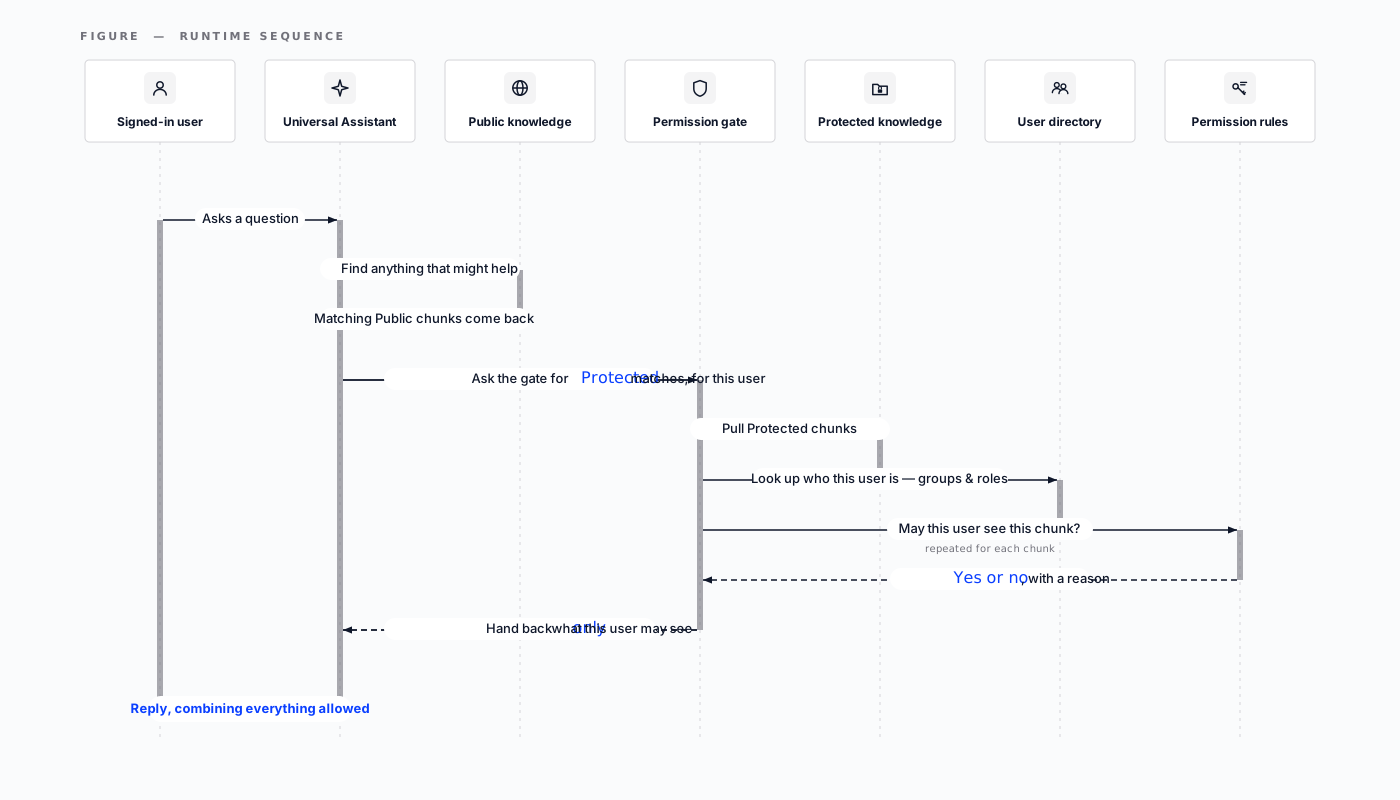
Now, the knowledge layer exposes two gates for every question, the Public gate and the Protected gate.
When a user asks a question, the knowledge layer pulls candidate chunks from Public content, ranks them on metadata, deduplicates near-identical text, and hands the surviving context to the agent.
When the question needs Protected content, the knowledge layer retrieves the policies that apply to the authenticated user, maps them to the chunk metadata, and applies them at the moment the question is asked, handing back only relevant and authorized chunks.
Anything short of that, and the assistant falls back to Public knowledge or tells the user the Protected material is unavailable for this request.
What's next for Infinize
Building the knowledge layer of Universal Assistant for higher education started from two givens: FERPA, with state-level student data acts on top, and SOC 2 Type II, the audit that asks whether security controls hold up over time. Those givens shaped the system. Identity is verified before any Protected retrieval, and authorization decisions are bound to a known user and recorded for replay. Every admin action, from uploading a document to redefining a group or retiring a policy, lands in an audit trail an institution can hand to an auditor without translation. Content is encrypted in transit and at rest, and reaches the agent only as context for the question being asked, never as training data.
That foundation is what the next round of work builds on:
- Automatic policy expiration: Access policies today live until an admin retires them. Adding TTLs and scheduled review windows means broad permits get revalidated on a cadence, so the access graph stays current with the institution.
- Review workflows at the edges: Flagging broad permits, broad forbids, stale resource groups, and orphaned documents so admins can repair the access graph before it drifts.
- Continuous access-safety evaluation: Online measurement of retrieval quality, citation accuracy, freshness, and access-control correctness.
- Fine-grained public content control: Admins today add, remove, and classify pages. Coming next is the ability to influence how individual Public pages rank in results.